Octopus Deploy is made up of a number of different configuration sets and managing them can be performed through a few different channels.
Octopus Web Portal
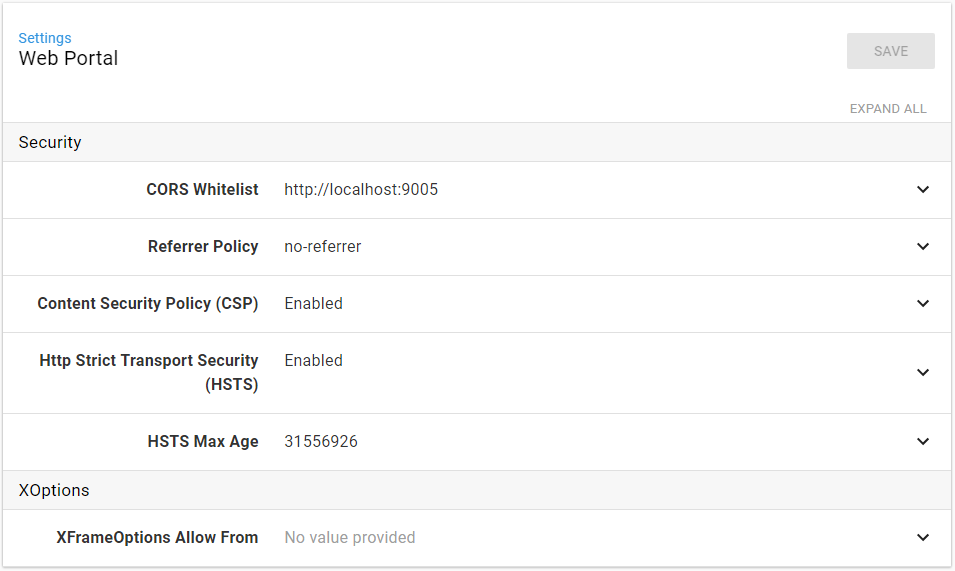
In the Octopus Web Portal, you can access configuration by navigating to Configuration ➜ Settings, this will show which configuration items are available.
Octopus.Client
Using Octopus.Client, each of the configuration types can be managed programmatically, reading from and writing back to the Octopus Deploy database.
This requires version 15.2.0 or later of the client library.
.Net / C#
To access the API from .Net you will need to add a NuGet reference to the Octopus.Client library and to at least one of the above Extensibility libraries.
var server = "http://myoctopusserver";
var apikey = "API-XXXXXXXX";
var endpoint = new OctopusServerEndpoint(server, apikey);
var repository = new OctopusRepository(endpoint);
var guestConfig = repository.Configuration.Get<GuestConfigurationResource>();
guestConfig.IsEnabled = true;
guestConfig = repository.Configuration.Modify(guestConfig);
For the Web Portal and Authentication configurations, you need the Octopus.Client NuGet package:
var server = "http://myoctopusserver/";
var apiKey = "API-XXXXXXXX";             // Get this from your 'profile' page in the Octopus Web Portal
var endpoint = new OctopusServerEndpoint(server, apiKey);
var repository = new OctopusRepository(endpoint);
var webPortalConfig = repository.Configuration.Get<WebPortalConfigResource>();
webPortalConfig.Security.HttpStrictTransportSecurityEnabled = true;
webPortalConfig = repository.Configuration.Modify(webPortalConfig);
PowerShell
add-type -path 'C:\PathTo\Octopus.Client.dll'
$server = 'http://myoctopusserver/'
$apikey = 'API-XXXXXXXX';
$endpoint = New-Object Octopus.Client.OctopusServerEndpoint $server,$apikey
$repo = New-Object Octopus.Client.OctopusRepository $endpoint
$getMethod = $repo.Configuration.GetType().GetMethod("Get").MakeGenericMethod([Octopus.Client.Model.Authentication.Guest.GuestConfigurationResource])
$modifyMethod = $repo.Configuration.GetType().GetMethod("Modify").MakeGenericMethod([Octopus.Client.Model.Authentication.Guest.GuestConfigurationResource])
$guestConfig = $getMethod.Invoke($repo.Configuration, $null)
$guestConfig.IsEnabled = $true;
$guestConfig = $modifyMethod.Invoke($repo.Configuration, $guestConfig)
For more information on using the Octopus.Client library see Octopus.Client.